
Files and documents
Each file says what the office does next and where every document stands.
- Each document on its own checklist line.
- Approve one, or all that are uploaded in one press.

For independent real estate brokerages
Files, documents, deadlines and agent pay in one place for your whole office. Each brokerage gets its own desk.
Sign up with your brokerage's Google Workspace account or a Gmail address. Want help? We'll set it up with you.
Built alongside a working Michigan brokerage.
Today: Every listing typed twice.
With Deskwork: One screen to open a file: agent, address, price.
Today: Made-up client emails just to save a file.
With Deskwork: A client is a name and a role. No email needed.
Today: Ticking off each document by hand.
With Deskwork: Drop the whole stack on the file. Each document lands on its checklist line; any it can't place waits for you.
Today: A spreadsheet per agent at year-end.
With Deskwork: Every agent's year-end totals, to the cent, in one CSV.
Today: “How close am I to cap?”
With Deskwork: Agents see their own cap, their pay this year and their statements.
Today: Change a split, and last year's figures change with it.
With Deskwork: Each closing keeps the plan it was paid on. Change a plan on a copy.
Pay & archive issues each agent's statement and emails it to them, with the split, the fees and their cap on it. If email reaches its daily limit or pauses itself, the statement waits until Live email can send it. An agent using their own Workspace domain can receive it at the exact address on the roster.


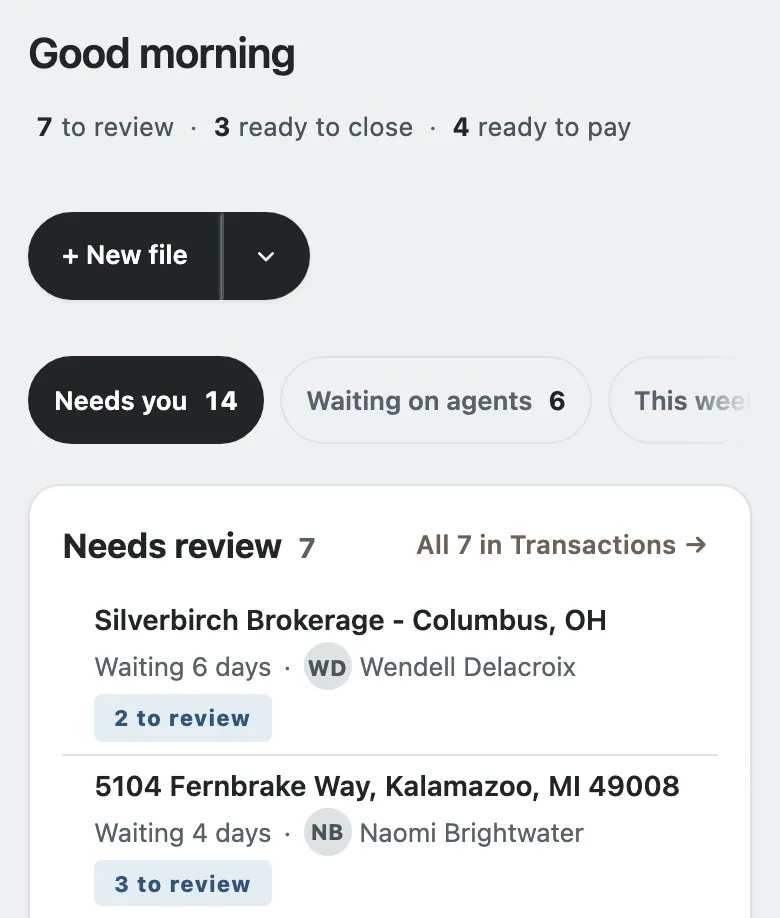
Real screens from an invented office. Your brokerage gets its own desk, at your-office.deskworkapp.com.
Each file says what the office does next and where every document stands.
A split with or without a cap, a fee-only plan, or tiers, each written out in plain words. Caps run on each agent's anniversary year.

Open files, closings, pay and cap progress for each agent on one page. At year-end, the annual report gives every agent's closings to the cent, as a CSV.

From the signup page to your agents signing in, in four steps.
Your brokerage's Google Workspace account or a Gmail address. No card.
More about signing upConfirm your brokerage's name. You become its broker-owner.
More about claiming your officeOpen the workbook you keep today. Nothing is filed until you say so.
More about your past filesAdd them to the roster, and they sign in with Google or Gmail, or, where your office offers it, with Microsoft.
More about adding your agentsNo ads, trackers or analytics. Documents go to your own Google Drive once you connect it; Deskwork keeps the file name, not the document. A picture chosen as the file's photo is kept with the file.
Read the privacy policyYour records, kept apartEach brokerage's records are stored separately, never in a database shared with other brokerages.
Leavers lose access fastTurn someone off in Google Admin and their access ends within an hour; mark them as left on the roster and it ends at once.
Every change on recordEach save records who changed what, and keeps the version it replaced.
Pay has its own ruleEach agent sees their own pay, and their team's unless you make it private. The broker-owner, office manager and assistants see all of it.
Statements and one morning summary; most other email only if you turn it on. Never marketing. Every kind, and who gets it
A desk you set up through the signup page is free: every feature on this page, every agent on your roster. No card, no trial clock.
If we ever add paid plans, your desk's owner hears first, and nothing is charged without their agreement. If we set up your desk for you, what your brokerage pays is set out in our written agreement with you.
Something else? See Help, or email support@deskworkapp.com.
Independent real estate brokerages that want one shared place for every deal, from the first paperwork to the agent's payout and the year-end totals.
Nothing when you sign up yourself, and no card is asked for. If we set up your desk for you, what your brokerage pays is set out in our written agreement with you. More about pricing
Yes. Agents sign in with your brokerage's Google Workspace accounts, or with a personal Gmail address once your broker adds that exact address to the roster. Where your office offers it, they can also sign in with a Microsoft 365 work account, or with a personal Outlook.com, Hotmail, Live or MSN address on the roster.
In your brokerage's own Google Drive. The broker-owner connects Drive once; then each file gets its own folder, a document you add goes straight into it, and one already in Drive can be attached. Deskwork keeps the checklist and the file names, not a second copy of the document. A picture chosen as the file's photo is kept with the file.
Yes. Open the commission workbook you keep today in Deskwork: it shows your figures beside its own and lists the past closings it has no file for. You see them first, and nothing is created until the broker-owner says so.
No. You pay agents the way you do today; Deskwork works out each share, writes the statement and emails it. No money or bank details pass through Deskwork, and your accountant still does the books. Your brokerage stays responsible for what it files and pays.
Sign up free with your brokerage's Google Workspace account or a Gmail address, and your desk is ready in a few minutes. Or request access and we'll set up your plans, roster and checklists with you.
Confirm your brokerage's name, filled in from when you signed up, and you become its broker-owner.
Add each person on the Roster with the address they will sign in with: Google Workspace or Gmail, or, where your office offers it, a Microsoft 365 work account or a personal Outlook.com, Hotmail, Live or MSN address on the roster. Adding them sends no email until you send invites.
Product progress
What is being built now, what comes next, and what just shipped.
Development milestones, not a service-status report.
Sign up free with Google, or have us set it up for you.